Fees · Updated August 2026 — Last verified August 2026
Quick Answer
Here’s how to pay passport fee online or in person: since July 1, 2026, passport offices no longer accept cash or National Bank counter payments. You now pay by scanning a QR code printed on your token using JazzCash, Easypaisa, or your regular mobile banking app.
⚠ Pay Only Through the Official Portal or Your Token QR Code
DGIP has publicly warned about scammers impersonating passport offices online — including a fake Google Maps listing for the Islamabad office demanding payment to a personal JazzCash account and bank number. DGIP states plainly that no individual is authorized to collect passport fees through personal channels, and that it has no collaboration with any website other than its own. The only QR code that’s valid is the one printed on your official token, generated in person or through onlinemrp.dgip.gov.pk directly. If anyone — online, by phone, or in person — asks you to scan a different code, pay to a personal account, or pay a “facilitator” for faster processing, treat it as fraudulent and report it to the DGIP helpline at 051-111-344-777.
What Changed on July 1, 2026
Passport fee payment used to run through National Bank branches or ATM challans. As part of the same reform package that approved the e-passport transition, DGIP moved fee collection entirely to mobile-based QR payments, stated goals being faster processing, more transparency, and cutting agents out of the payment chain.
How to Pay Passport Fee Online, Step by Step
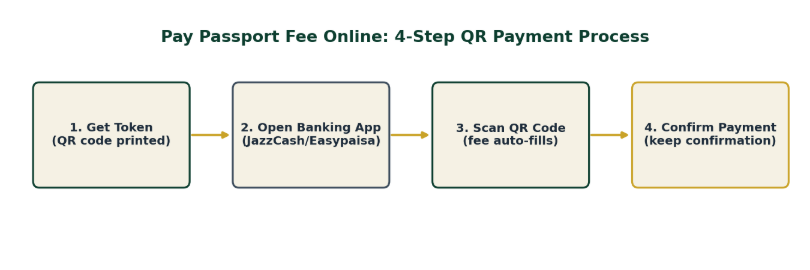
How to pay passport fee online — get your token, open your banking app, scan, and confirm.
1. Get your token — Visit the passport office or start online; your token carries a printed QR code.
2. Open your banking app — JazzCash, Easypaisa, or most standard mobile banking apps support this.
3. Scan the QR code — The exact fee for your selected validity, pages, and processing speed populates automatically.
4. Confirm payment — Keep the digital confirmation — it replaces the old paper challan receipt.
Why Your QR Total Might Be Higher Than the Base Fee Table
If you generated your token through the DGIP online portal rather than in person, your QR total already includes a flat online service charge on top of the base government fee — PKR 1,000 (inclusive of tax) for inland applicants, or PKR 2,500 plus applicable tax for overseas applicants, regardless of page count or validity. This isn’t a separate step or an extra scan; it’s baked into the single amount your QR code shows, so don’t assume the code is wrong just because it doesn’t match the bare fee schedule quoted elsewhere. See our fee schedule for the full breakdown of base fees versus the portal service charge.
Practical Note
This is a genuinely new system — if a queue or staff member still points you toward a bank counter or cash payment, that’s outdated guidance, not a regional exception. Bring a phone with a working banking app installed before you go; there’s no cash fallback at the counter anymore.
What if I Don’t Have a Mobile Banking App?
You’ll need to set one up before your visit — JazzCash and Easypaisa accounts can typically be opened using just your CNIC at a nearby franchise or agent, often within the same day. Arriving at the passport office without any way to scan the QR code will stall your application at the payment step.
Know the fee amount before you go — check the full 2026 fee schedule.
Frequently Asked Questions
Can I still pay at a National Bank branch?
No, bank-counter payment for passport fees ended June 30, 2026, alongside the shift to QR-based payment.
Does the QR code work with any bank’s app?
Most standard mobile banking apps in Pakistan support scan-and-pay; JazzCash and Easypaisa are the most commonly used at passport offices specifically.
What if the QR payment fails?
Ask the counter staff to regenerate the token/QR code — failed transactions don’t always deduct funds, but confirm with your bank app before retrying.
Is there a fee for paying via JazzCash or Easypaisa?
Your wallet provider’s own standard transaction terms may apply, but there’s a more important number to know: if you generated your token through the online portal, DGIP itself already adds a flat PKR 1,000 (inland) or PKR 2,500 (overseas) service charge into the total your QR code shows — see the section above on why your QR total might look higher than the base fee.
How do I know if a QR code or payment request is legitimate?
The only legitimate QR code is the one printed on your official token from a passport office visit or the DGIP online portal. DGIP has warned that scammers have posed as passport offices — including a fake Google Maps listing — to collect payments through personal accounts. If anything about a payment request feels off, verify through the DGIP helpline (051-111-344-777) before paying.
Bottom Line
To pay passport fee online safely in 2026, all you need is a working mobile banking app and your token’s official QR code — the process itself is simple, and the only real risk is scanning the wrong code or paying the wrong party. Stick to the official portal and your printed token, and the rest is a two-minute scan-and-confirm.